Pro Credit Card Reader NFC
- 4.4
- Rating
- 10.00K
- Installs
- $5.99
- Price
 Analysis by App-foxy
Reading information from a contactless bank card sounds simple until the phone refuses to detect it, the card is positioned slightly off, or the result is less detailed than expected. I found that Pro Credit Card Reader NFC is most useful when you understand exactly what it is designed to do: it reads public data available through NFC from compatible VISA and MasterCard contactless cards. It is not a general banking app, a payment wallet, or a replacement for the official app from your bank.
That distinction matters from the first tap. The app sits in the finance category and comes from Julien MILLAU. It costs $5.99, carries an Everyone age rating, and has built a respectable audience with a 4.4 average from around one thousand ratings and more than ten thousand installs. I can see why it appeals to people who want a direct card-reading tool rather than a full financial dashboard, but I also think it rewards patience. The quality of the result depends on the card, the phone, NFC behavior, and the way the card is held.
Getting past the points where most users get stuck
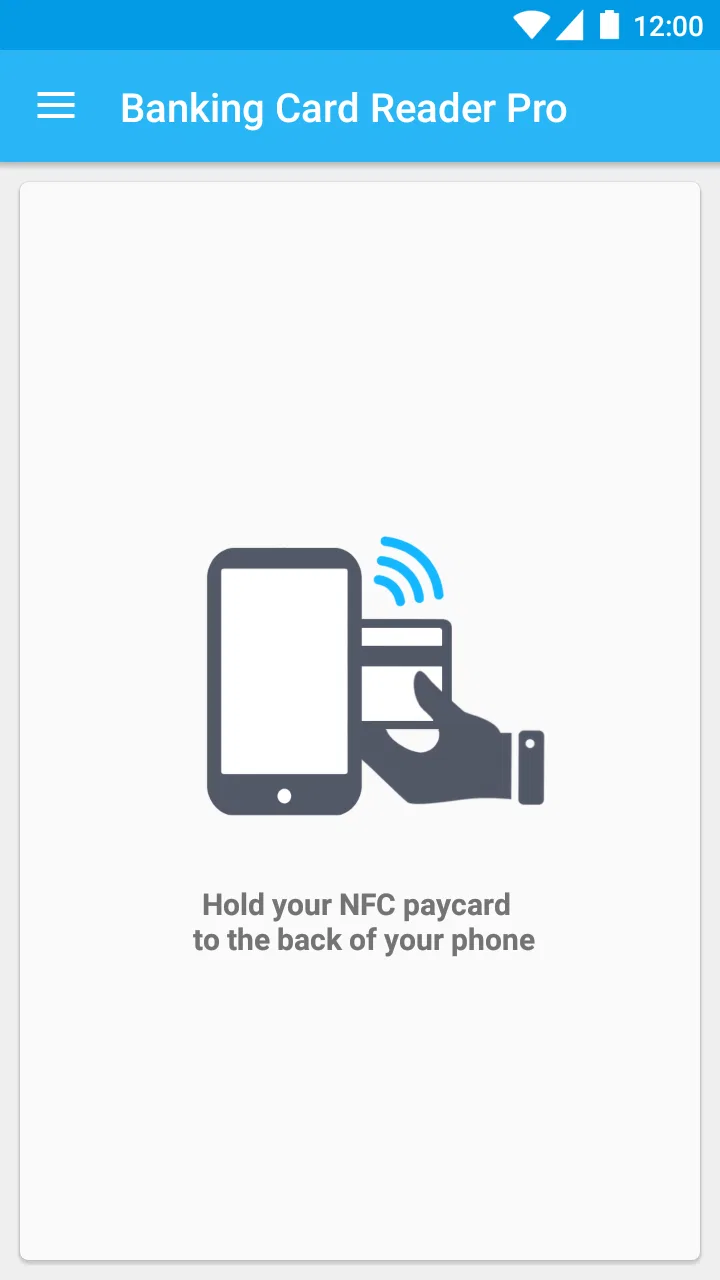
The most common frustration is probably not inside the reading process itself. It is the moment before it, when the phone does nothing after the card is placed near it. NFC antennas are not located in exactly the same place on every Android phone. On some devices, the useful area is near the upper back; on others, it is closer to the center. A card can appear to be touching the phone while the antenna and chip are still not aligned.
You May Also Like

 AccuWeather: Weather Radar
AccuWeather Review: A Quick, Clear Forecast for Everyday Decisions
For everyday plans, the best forecast is the one you can understand quickly. AccuWeather makes rain timing, radar, and local conditions easy to act on, with a few trade-offs.

 Hill Climb Racing
Why Hill Climb Racing Still Turns Crashes Into One More Run
A tiny car, a bumpy hill and one more upgrade: Hill Climb Racing keeps resurfacing because its simple chaos makes every near-miss feel personal.

 AliExpress - Shopping App
AliExpress Makes Global Shopping Feel Personal, but Shoppers Bear the Risk
AliExpress turns a global marketplace into a pocket-sized discovery engine. Its reach is useful, its shopping loop compelling, and its trade-offs easy to miss.

 Lords Mobile: Kingdom Wars
Lords Mobile Is a Kingdom-Building Routine, Not a Quick Match
A case-by-case verdict on the building, battles, device demands, and social commitments that make Lords Mobile rewarding for some players and exhausting for others.

 PDF Scanner app - TapScanner
TapScanner Makes Paperwork Easier to Capture, Check, and Share
TapScanner makes scanning with a phone feel less like a rescue operation and more like a dependable step in getting work done. Its capture tools are useful, though not flawless.

 Block Blast!
 Shows How Much a Puzzle Game Can Leave Out
A quiet grid game shows why puzzle players increasingly value instant clarity, repeatable skill and low-pressure play—and where the genre still needs to catch up.
More From Our News Desk
View All News


My practical advice is to begin with the phone unlocked and move the card slowly across the back rather than repeatedly tapping it in one spot. Hold it still for a moment when the phone reacts. Pulling the card away too quickly can interrupt the exchange and make the app look unreliable when the real issue is simply timing. A rigid phone case, a wallet case, or other cards kept against the contactless card can also make positioning harder.
There is another expectation problem. The app reads public data exposed through the card’s NFC interface, but that does not mean it can reveal every detail associated with the account. The visible result can vary between cards issued by different banks and networks. If you expect a complete transaction history, a live balance, or private account information, this is the wrong tool. The sensible expectation is a technical reading of information made available by the card, not a secure window into your banking profile.
I also recommend treating the first attempt as a positioning test rather than a pass-or-fail verdict. Try the card flat against the phone, then rotate it and test another area of the device. Keep the card still once detection begins. This small change in technique is more useful than repeatedly closing and reopening the app.
What the first reading can and cannot tell you
When a reading succeeds, the important question is not only whether information appeared, but whether it matches the card you intended to inspect. If you are checking several cards, separate them physically and read them one at a time. Contactless cards stacked together can create confusion because the phone may not communicate cleanly with the intended chip.
I would also avoid using a bank card while it is inside a crowded wallet. Even if the phone detects something, the presence of other cards can make the result difficult to interpret. A clean test with one card on a bare phone gives you a much better baseline. That is a useful habit for anyone comparing an older card with a replacement or checking whether a newly issued card is being detected correctly.
The app’s value is strongest for people who need a quick, focused inspection. For example, imagine receiving a replacement card and wanting to compare its contactless behavior with the previous one before putting the old card away. This reader can give you a convenient first check without opening a bank account or entering credentials. It is also handy for someone cataloguing cards in a household, provided each card is handled separately and the resulting information is treated as sensitive.
Setup checks that save time
Before blaming the reader, I would check the phone itself. The application requires Android 6.0 or later, and the current version is 5.6.2. That makes the operating-system requirement fairly approachable, but compatibility is more than an Android version number. The handset must also have working NFC hardware. If NFC is missing or disabled, no card-reading application can create that capability.
Look in the phone’s settings for NFC and make sure it is enabled. The exact menu name can differ between manufacturers, so I would use the settings search rather than relying on a particular path. If NFC is already enabled, switch it off and on once, then return to the reader. This is a simple reset that can clear a temporary communication problem without changing anything on the card.
Next, remove thick cases and magnetic accessories for the initial test. I would not begin with a card inside a wallet or pressed against another contactless object. Place the card on the back of the phone, move it gradually, and wait for the device to react. Once you find the phone’s NFC sweet spot, remember it for future readings; that is often the biggest improvement in day-to-day use.
It is also worth checking the card type before drawing conclusions. The app is intended for public data on NFC contactless VISA and MasterCard banking cards. A different kind of card, a card without contactless functionality, or a card whose NFC data is not exposed in a compatible way may not produce the result you expect. The absence of a reading does not automatically mean the application is broken.
Because this is a finance app, I would approach privacy with the same care I use for any card-related tool. Do not share screenshots or copied results casually, even when the information looks technical. Keep the card in your possession during testing, and avoid experimenting with someone else’s card unless you have clear permission. The fact that information is publicly readable over NFC does not make it appropriate to distribute.
A reliable recovery routine when a reading fails
When the first attempt fails, I prefer a controlled sequence instead of changing several things at once. First, close the reading screen if necessary and return to a clean start. Confirm that NFC is still enabled, remove the case, and test with one card only. Then move the card slowly over the back of the phone and hold it still when detected.
If that does not work, restart the phone and try again before assuming the card or app is defective. A restart can restore NFC behavior after another service has temporarily interfered with it. I would also test a second compatible contactless card if one is available. That comparison is valuable: if another card reads successfully, the original card or its NFC interface becomes the more likely source of the problem.
Do not repeatedly bend, scrape, or aggressively press the card against the phone. NFC is a short-range radio connection, not a contact-based reader that needs force. Excessive pressure will not improve the signal and could damage the card. Slow movement and stable alignment are safer and usually more effective.
If the app opens but the result is incomplete, I would first repeat the reading with the card isolated. Different cards can expose different public fields, so a shorter result is not automatically a failed scan. Compare the output only after confirming that the same card was held in the same way and that no other card was nearby.
The paid model also changes how I would troubleshoot. Since the app costs $5.99, I would perform the basic phone and card checks before buying it, where possible, rather than assuming payment guarantees compatibility with every handset or card. The price makes sense for a focused utility if it solves a specific need, but it is harder to justify for someone who only wants to try NFC once out of curiosity.
When the phone, card, or expectation is the real problem
It is easy to blame an app because it is the visible part of the process. In practice, the phone’s antenna location, a disabled NFC setting, a thick case, or a non-compatible card can all produce the same apparent failure. That is why testing the handset with a known compatible contactless card is such a useful diagnostic step.
The bank can also be relevant. Cards are not identical simply because they carry the same network brand. Issuers can expose different public information, and card designs can place the chip in slightly different physical positions. A card that reads well on one phone may require more careful placement on another. These differences are normal enough that I would not judge the application from a single unsuccessful attempt.
There is a security boundary here that users should understand clearly. This reader is not the right choice for making payments, managing transfers, freezing a card, checking an account balance, or replacing a bank’s authentication process. For those tasks, the official banking application or wallet is the better alternative because it is built around account access and payment management. Pro Credit Card Reader NFC serves a narrower purpose: inspecting public NFC data from a suitable contactless card.
It also is not a substitute for a physical card terminal when you need to verify whether a payment will be accepted. A successful technical read does not promise that a merchant terminal, bank system, or payment wallet will behave in a particular way. Conversely, an unsuccessful read on your phone does not prove that the card’s contactless payment function is unusable. Those are separate situations.
How it compares with ordinary finance tools
Most finance apps are organized around accounts, budgets, transactions, alerts, and payments. This one is much narrower and more hands-on. That can feel refreshing if you do not want to sign in or navigate a large financial dashboard, but it also means there is little value here for someone seeking ongoing money management.
Compared with a bank’s app, the reader is quicker for the specific job of inspecting a card’s NFC data, but it cannot provide the account context that makes banking software useful. Compared with a general NFC utility, it is more relevant to contactless banking cards because its purpose is focused on VISA and MasterCard card data. The trade-off is that its usefulness depends heavily on the card and phone combination rather than on a broad collection of NFC tasks.
I would choose it over a general finance app when I need a direct card check and already have a compatible Android phone. I would choose the bank’s official app when the question involves money, account activity, payment controls, or personal records. I would skip both the reader and a general-purpose NFC tool if my phone has no NFC hardware or if my card is not a compatible contactless banking card.
Who will get the most from this focused reader?
This app suits technically curious users, people comparing contactless cards, and anyone who wants to inspect the public information available from a card without turning the task into a full banking session. It can also be useful when troubleshooting a newly issued card, as long as the user understands that a technical NFC reading is only one part of the overall card experience.
I would be more cautious recommending it to someone who wants a simple everyday finance companion. The app will not replace budgeting, payment tracking, account alerts, or card controls. It also may frustrate users who expect every card to expose the same information or who are unwilling to spend time finding the phone’s NFC antenna position.
The Everyone rating makes it broadly approachable, but responsible handling still matters because the subject is a bank card. I would explain the purpose before handing the phone to a child or another inexperienced user, and I would avoid leaving card details visible in screenshots or shared logs. Ease of access should not be confused with permission to inspect someone else’s financial card.
My practical verdict after using it
My view is that Pro Credit Card Reader NFC is a specialized tool rather than a complete finance application. Its strongest point is focus: it gives users a way to read public NFC data from compatible contactless VISA and MasterCard cards without pretending to be a bank wallet or account manager. That makes it genuinely useful for a small but clear set of situations.
The main friction is equally clear. A successful experience depends on NFC being available and enabled, the phone case not getting in the way, the card being compatible, and the user holding it over the correct part of the handset. Those are not flaws that can be solved by adding more financial dashboards. They are part of the physical nature of NFC, and the app is easiest to appreciate when you accept that limitation.
With its $5.99 price, I would recommend it when you have a specific card-reading need and have already confirmed that your Android phone supports NFC. I would not buy it merely because the phrase “credit card reader” sounds like it might reveal banking details. For ordinary banking, use the official alternative. For focused inspection of public contactless card data, this is a sensible, compact option.
The developer is Julien MILLAU, the app was released on Nov 5, 2015, and its current version is 5.6.2. Those details suggest a focused utility with an established presence rather than a newly launched experiment. In the end, I would keep it for occasional card checks, use it carefully, and judge it by whether it handles the exact compatible card-and-phone combination I need—not by expecting it to become a general-purpose banking tool.
FAQs for Pro Credit Card Reader NFC
01What is Pro Credit Card Reader NFC and what can it do?
Pro Credit Card Reader NFC is designed to read compatible contactless card information through a phone’s built-in NFC sensor. After enabling NFC and placing a supported card near the correct area of the device, the app may display publicly readable details, such as card type or limited identification data. It is not a payment terminal, card-cloning tool, or replacement for a bank’s official application.
02Does Pro Credit Card Reader NFC work with every credit or debit card?
No. Compatibility depends on the card technology, NFC standard, issuer restrictions, and the capabilities of your Android device. Some cards expose only basic information, while others intentionally prevent reading altogether. Cards without contactless functionality cannot be scanned, and results can vary between phones. Before downloading, check that your device supports NFC and remember that a successful scan is never guaranteed.
03Is Pro Credit Card Reader NFC safe to use with my bank cards?
You should treat the app as a utility that handles potentially sensitive financial information. Only scan cards that belong to you or that you are explicitly authorized to test, and avoid sharing screenshots or scan results. Do not enter PINs, passwords, CVV codes, or online-banking credentials into an unofficial reader. For payments, account management, or security questions, use your bank’s official app.
04Can this app read the card number, CVV, balance, or transaction history?
NFC readers generally cannot provide complete banking information. Depending on the card and its security settings, the app may read limited contactless data, but it should not be expected to reveal your balance, transaction history, PIN, or CVV. Some displayed data may also be incomplete or difficult to interpret. Never assume that a scan confirms whether a card is active or usable.
05What should I do if Pro Credit Card Reader NFC does not detect my card?
First, confirm that NFC is enabled in your phone’s settings and remove thick cases, metal accessories, or other cards from the area. Hold the card steadily against the phone’s NFC antenna, which may be located near the top or center of the device, and try again. If detection still fails, the card may be incompatible, blocked from reading, or unsupported by your phone.
Pros
- Reads contactless cards quickly on compatible NFC-enabled phones.
- Useful for checking card details without carrying an external reader.
- Simple interface makes occasional scans easy to perform.
- Can help verify whether a card supports contactless NFC technology.
- Portable solution with no additional hardware or cables required.
Cons
- Requires an NFC-equipped Android phone to function properly.
- Some cards may block reading or provide only limited information.
- NFC scans can fail if the card is poorly aligned with the phone.
- Not a payment terminal and cannot process card transactions.
- Privacy concerns may arise when scanning cards in public or shared spaces.

Pro Credit Card Reader NFC
Gallery